




























Google AI Studio apps can now install on your own Android devices through Google Play, using nothing more than a standard Google account. The announcement says you need no developer account. Google announced the feature Oct. 13, 2026, and said it starts rolling out that day in select markets, including the U.S., for users 18 and older.
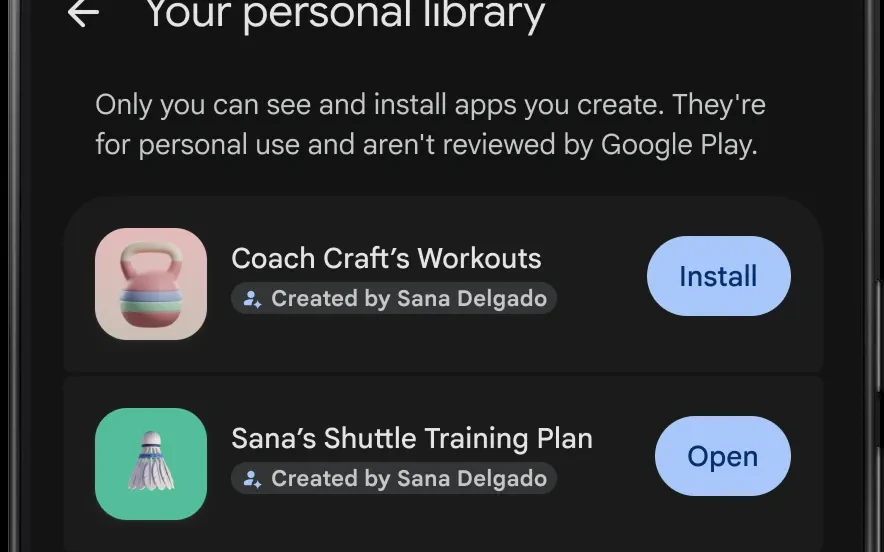
The apps go into a new personal library area of the Play Store, away from the public catalog. Google’s preview of the library screen says Google Play does not review these apps, and the on-screen text spells the limit out plainly: “Only you can see and install apps you create. They’re for personal use and aren’t reviewed by Google Play.”
What you can do now
AI Studio builds the app from a written prompt, the same prompt-first pattern TMM covered in Meta Pocket’s AI games. Its agent generates a Kotlin project using Jetpack Compose, then runs it in a browser-based Android emulator so you can try the result. You keep refining the app in the chat panel. You can also edit the generated code in the Code tab, or download the project as a ZIP file. However, the documentation narrows what those projects can be: they are client-side Android apps for phones and tablets, with no server component, so features that need a server runtime, such as Firebase, Google Workspace APIs, secrets management and multiplayer, are not available. Google’s documentation supports phone and tablet targets only, not Wear OS or Android TV.
Google describes personal apps as “private, secure, and separate from the public store catalog.” Still, the announcement does not name an Android version requirement. It does not list the other select markets, or say what the personal route costs.
Getting your app to other people
In the coming months, users will be able to share personal apps with a close circle of friends and family. For anyone who eventually wants a public listing, Google Play points to its existing professional developer account. A graduated app faces the same Trust & Safety reviews and quality standards as any professional developer’s app.
AI Studio has a developer route as well. It can package an app and publish it to an internal testing track in Google Play Console. That route requires a Google Play Developer account, with a one-time $25 registration fee, and caps distribution at 100 testers, Google’s AI Studio documentation states. The personal-library route does not require a Play Developer account.
Discovery changes around it
The personal library arrives with a wider set of Play Store changes announced the same day. Ask Play, Google’s AI-powered discovery feature in the store, lets you ask a question and get tailored recommendations. Starting Oct. 13, Ask Play can also compare apps side by side, highlighting key differences and user sentiment, Google said. Meanwhile, Play in Gemini brings Play Store apps, games and developer content into Gemini conversations, which Google says will start rolling out to all Gemini users soon.
Game Finder began rolling out in English to U.S. users on Oct. 13, 2026, with additional markets coming soon, and it recommends games using Gamer DNA, a taste profile built from how you play and the preferences you share. Sprints began rolling out to all markets that day as 48-hour micro-challenges for groups of two to five players, but Sidekick, Google’s in-game overlay, remains limited to select devices.
What to watch
The practical limit today is audience. Your app reaches your own devices, in a supported market, if you are 18 or older. Google’s announcement does not say whether personal library apps get any automated safety scan before they reach your device. It also does not list which markets come after the first group. The announcement describes one route to a public listing: the professional developer account and its reviews.