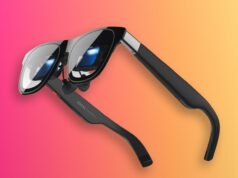

























Halliday G2 AI glasses put workplace AI at the upper edge of your vision, not in another browser tab. Halliday says its new $599 camera-free smart glasses can show live captions and surface quick research. They can also flag incomplete commitments and assemble a structured record while a meeting is still happening.
That promise is ambitious, and it remains a promise for now. Tech My Money has not tested production hardware. Halliday supplied Tech My Money with its final launch release, product briefing and September feature list. The company plans first shipments for September 2026, when its core Meeting Flow tools should become available.

What makes Halliday G2 AI glasses different
Most meeting assistants live on a laptop, phone or conference-room display. They record, transcribe and summarize a conversation, but their most useful output often arrives after everyone has left. Halliday wants G2’s defining experience, called Meeting Flow, to intervene earlier. It can respond while a decision takes shape, a deadline remains missing or a discussion drifts from an unresolved issue.
The glasses use a binocular waveguide display driven by dual micro-LED projectors. Halliday lists a resolution of 600 x 300 pixels per eye and up to 1,600 nits of peak brightness. Information appears in the upper field of view. Therefore, wearers should be able to glance at a card without completely breaking eye contact. The display also dims in darker rooms. Meanwhile, Stealth mode reduces visible light that other people might notice.
This pitch differs from the spatial apps and large virtual screens associated with Samsung and Google’s Android XR smartglasses. Halliday is not presenting G2 as a full mixed-reality computer. Instead, it is building a narrower, glanceable display around conversation support.

Meeting Flow listens for the moments that change an outcome
Halliday divides Meeting Flow into three layers: follow the conversation, shape the outcome and close the loop. According to the company’s launch documentation, several AI processes can run in parallel over the meeting audio. Halliday describes Decision Confirmation, Thread Tracker, Commitment Check and Open-Item Tracker as automatic. Meanwhile, users trigger Quick Summary and Quick Research when they need them.
Follow the conversation
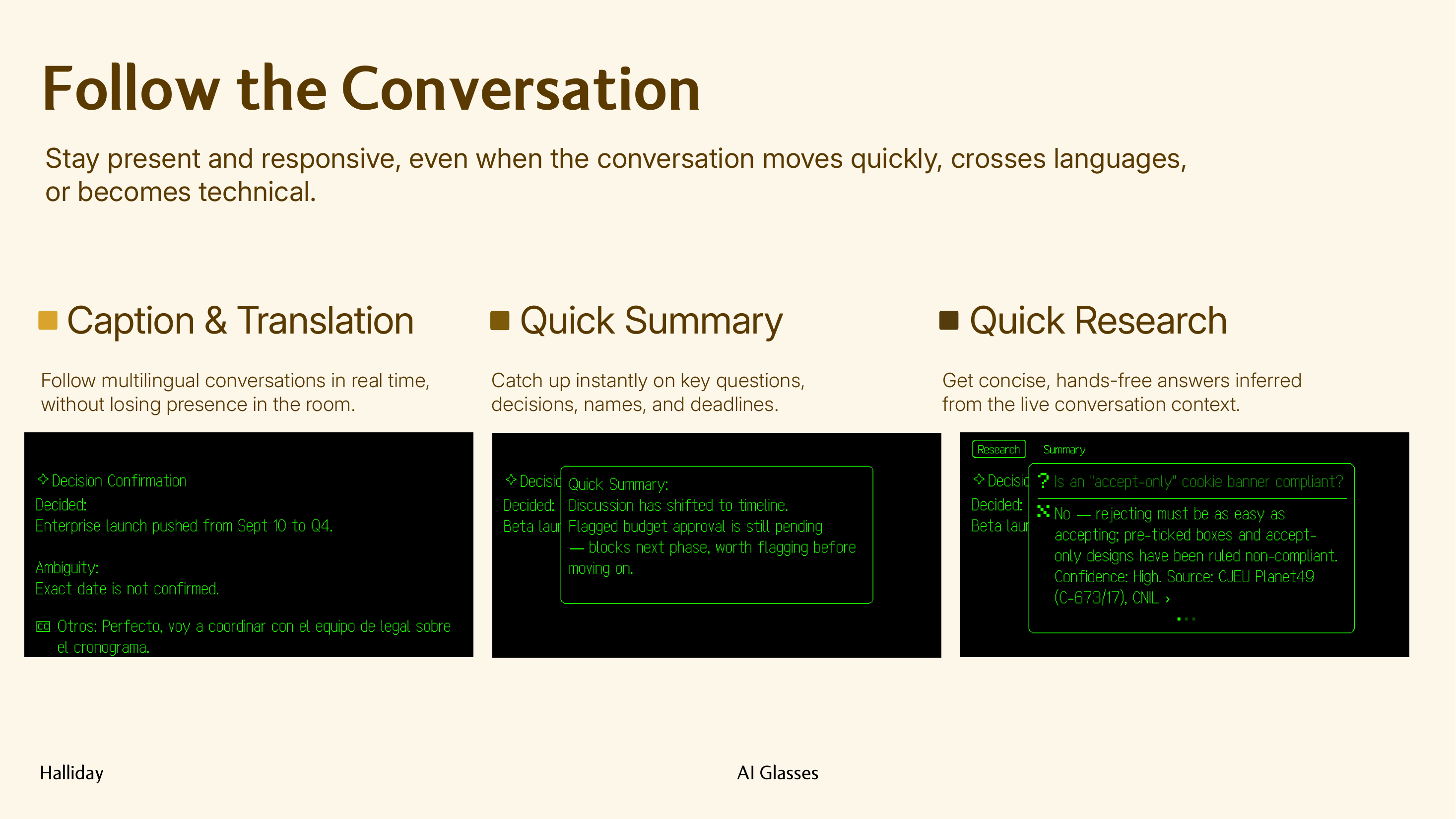
According to Halliday, Caption & Translation places live captions in the wearer’s view. It can also translate conversations in more than 45 languages. However, Halliday has not published a launch-day language list or accuracy figures. Independent testing must determine the breadth and reliability of that support.
Quick Summary helps when someone’s attention slips. A wearer can request a brief recap of recent questions, names, decisions and deadlines. As a result, the wearer may not need to ask the room to repeat itself.
Quick Research uses the recent conversation to infer what the wearer wants to know. It then displays a concise answer and confidence level. Halliday says complete sources will remain available in the companion app. That detail matters. Wearers should check the underlying source before treating a short answer as authoritative.
Shape the outcome
Thread Tracker maps how a conversation moved from one subject to another and points out earlier topics that remain open. Halliday says the tool does not judge whether a tangent is good or bad. Instead, it shows a path the wearer can follow, refocus or use to revisit an unresolved issue.
Decision Confirmation looks for a decision that appears to be forming. It can restate the apparent agreement and identify ambiguity. Then it can suggest a clarifying question before the conversation moves forward.
Commitment Check focuses on accountability. Someone might make a promise without establishing an owner, action or deadline. In that case, the glasses can flag the missing element while everyone is still present.
Close the loop
Open-Item Tracker keeps a running list of unanswered questions, unclear decisions and incomplete commitments. Halliday says the tool can surface that checklist as a meeting approaches a natural stopping point. It may also respond when someone asks whether the group needs to cover anything else.
Post-Meeting Summary & Transcripts moves the result to Halliday’s companion app. The app organizes confirmed decisions, assigned commitments, unresolved items and a transcript. Therefore, the user should receive more than a raw recording or undifferentiated block of notes.
The hardware is designed around meetings
Halliday rates the four-microphone array for voice recognition at distances up to two meters. The company tunes the system to separate the wearer’s speech from other voices. That separation could improve transcription, translation and contextual understanding in multi-person rooms. However, the press materials do not provide benchmark methodology, room-noise conditions or error rates.
Halliday is targeting a weight below 50 grams and more than 12 hours of typical use. The quoted runtime covers meetings, calls, notifications, translation and other daily features. However, Halliday has not disclosed a standardized battery-test procedure. Continuous transcription and maximum-brightness use could produce a different result.
| Specification | Halliday’s announced detail |
|---|---|
| Display | Binocular waveguide with dual micro-LED projectors |
| Resolution | 600 x 300 pixels per eye |
| Peak brightness | Up to 1,600 nits |
| Microphones | Four-microphone array with up to 2-meter voice pickup |
| Battery | More than 12 hours of claimed typical use |
| Weight | Targeting less than 50 grams |
| Camera | None |
| Prescription support | Prescription lens options planned |
| Controls | Frame touchpad, action button, power button and “Hey Halliday” voice command |
Camera-free does not mean privacy-free
Leaving out a camera should make G2 easier to accept in offices and client meetings. Camera-equipped glasses can create immediate discomfort in those spaces. The choice also distinguishes Halliday from the face-processing questions that have followed Meta’s smart glasses software.
However, Meeting Flow still depends on microphones listening to live conversations. Its post-meeting tools also create transcripts and structured records. Participants may want a clear indicator whenever the system is active. They also need answers about processing location, retention, storage controls and model training.
Halliday’s press kit does not answer those questions or detail encryption, enterprise controls, compliance certifications or an in-room recording indicator. Users will also need to follow workplace policies and local consent laws before capturing conversations. A lack of video narrows the privacy problem; it does not eliminate it.
G2 also works as everyday smart eyewear
Outside meetings, Halliday lists calls, audio, notifications, schedule and weather cards, the Halliday AI Assistant and real-time translation. Cheatsheet acts like a teleprompter for notes, scripts and reminders.
Controls include a frame touchpad, a customizable action button, a power button and the “Hey Halliday” wake phrase. Users can choose between quiet physical input and hands-free commands. However, Halliday has not explained whether an organization can disable voice requests.
Halliday plans prescription lens options. That support is essential if G2 is to become primary eyewear instead of an occasional gadget. The kit does not specify prescription ranges, lens partners or added cost. It also does not say whether a local optician can fit replacement lenses.
Price, reservation and September release
Halliday expects G2 to retail for $599. Starting July 21, customers can place a $10 deposit through Halliday’s website. The company says the reservation secures a $100 discount on the final retail price. That would bring the glasses to $499 before prescription lenses, taxes or optional services.
Halliday plans first shipments for September 2026. The feature reference says Meeting Flow’s eight core capabilities will arrive that month. Meanwhile, Halliday describes deeper continuity and personalization across conversations as a longer-term roadmap. Buyers should judge G2 on what ships, not on context-building features that may arrive later.
What Halliday still needs to explain
The launch materials establish the concept, headline specifications and September feature set, but several buying details remain open:
- Field of view, refresh rate and how readable the display remains outdoors at peak brightness
- Supported iPhone and Android versions, companion-app requirements and offline behavior
- Whether Meeting Flow requires a subscription, and what AI usage limits may apply
- Audio-processing location, data-retention controls, encryption and enterprise administration
- Charging time, charging method, battery-replacement policy and water-resistance rating
- Exact prescription options, additional cost and the process for replacing lenses
- Independent accuracy for captions, translation, speaker separation and automated decisions
Early outlook
Halliday G2 has a sharper purpose than many smart-glasses launches. It does not promise to replace a laptop or overlay an entire spatial operating system. Instead, it focuses on small pieces of information that could change a live conversation. Examples include a missed deadline, an unresolved question, a translated sentence or a fact that needs checking.
The central risk is the same thing that makes the product interesting. Meeting Flow must understand context without distracting the wearer or misrepresenting an agreement. It must also avoid making everyone else feel recorded. Halliday could have a practical meeting tool if it delivers useful prompts, credible citations and transparent privacy controls. Until production units and final software arrive, its display quality, battery life and AI accuracy remain unverified.