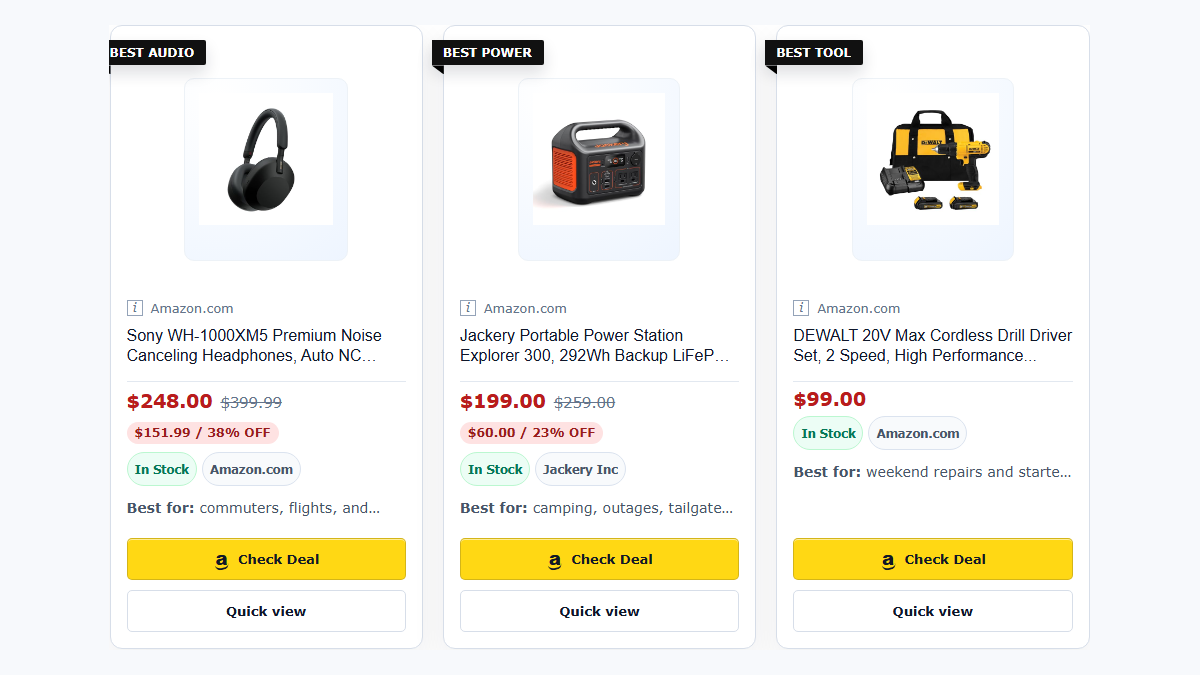
Disclosure: TMM Affiliate Blocks Free vs Pro is an editorial guide from Tech My Money, the team behind the plugin. We cover our free WordPress plugin and its separate Pro add-on. We do not claim endorsement from WordPress.org, Amazon, AAWP, Lasso, or any other product.
TMM Affiliate Blocks gives WordPress publishers affiliate modules that support a real editorial workflow. First, the free plugin covers editor essentials. Those include responsive Product Boxes, Deal Links, Link Embeds, reusable destinations, disclosure tools, diagnostics, and cache-first Amazon-backed fields. Meanwhile, the separate Pro add-on supports reporting, review queues, reusable collections, advanced comparisons, and private updates.
That distinction matters. An affiliate plugin should not invent a live price when its data source is unavailable. It also should not turn a writer into a shortcode mechanic. The TMM Affiliate Blocks WordPress.org listing documents the free core, the Pro boundary, and the data rules. This guide explains the workflow, the honest comparison points, and what a publisher can build today.
What TMM Affiliate Blocks is built to solve
A buying guide needs more than a blue button. For example, it needs a clear recommendation and an honest note about who the item suits. In addition, it needs a retailer destination, an affiliate disclosure, and a layout that survives a narrow mobile column. Finally, it needs a graceful response when product data is temporarily unavailable.
TMM Affiliate Blocks supports product reviews, deal posts, buyer guides, and smaller product mentions. Editors do not need a custom template for every article. For example, our Memorial Day buyer guide uses the system for product choices and a comparison-oriented shopping path. Meanwhile, this GoveeLife deal guide uses smaller card and CTA surfaces. Those surfaces keep the editorial page readable and separate the offer details from surrounding copy.

What is included in the free plugin
The free plugin is meant to be useful on its own, not a screen full of locked buttons. It includes the publishing surfaces a writer reaches for most often:
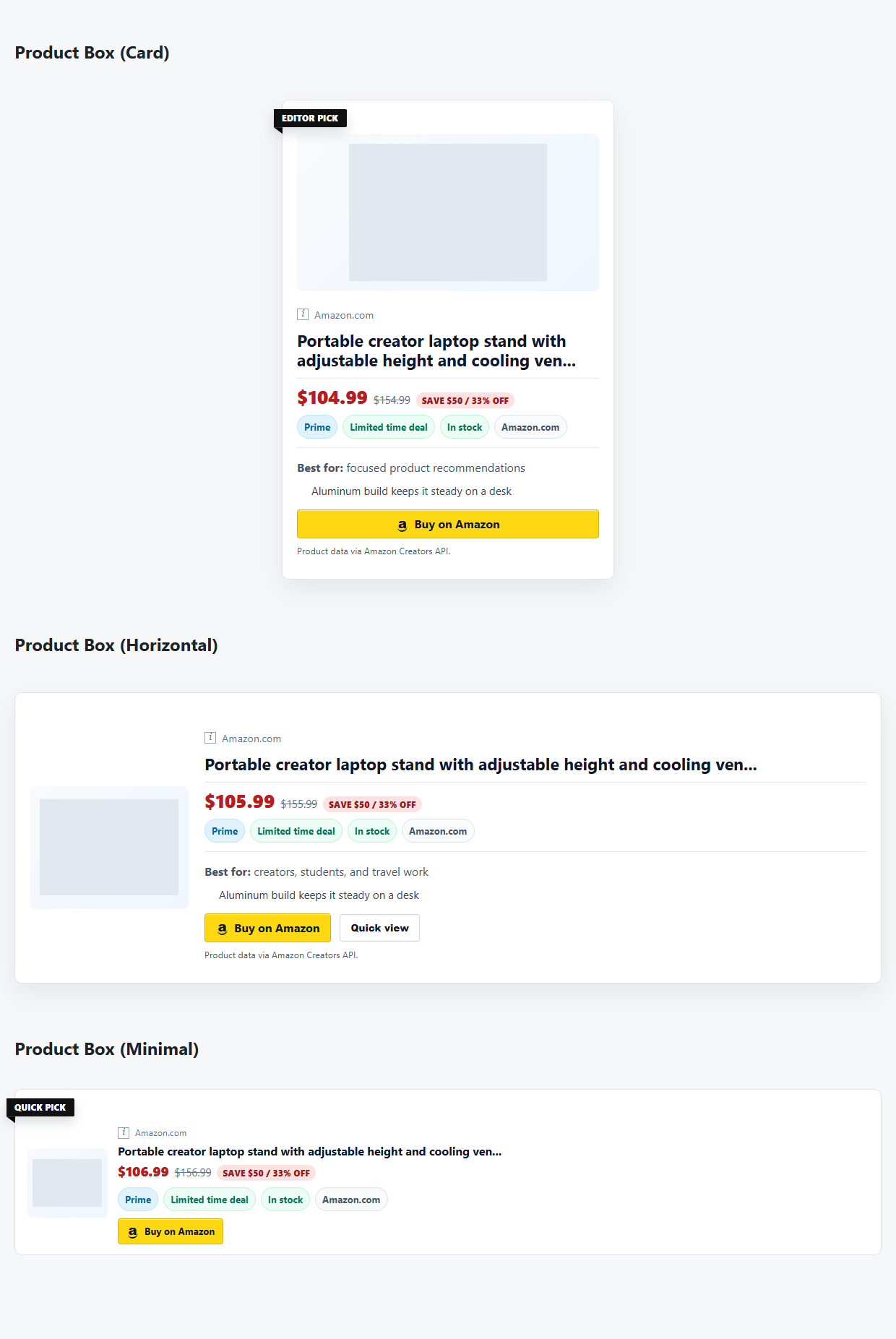
- Product Box: a full editorial recommendation in Card, Horizontal, or Minimal form. The variants share one trusted renderer. Publishers can change presentation without creating a second data path.
- Deal Link and Link Embed: lighter-weight options for a quick product mention, a retailer check, or a compact affiliate call to action inside a news post.
- Data Field: inline output for approved product fields when the configured source and cache actually provide them.
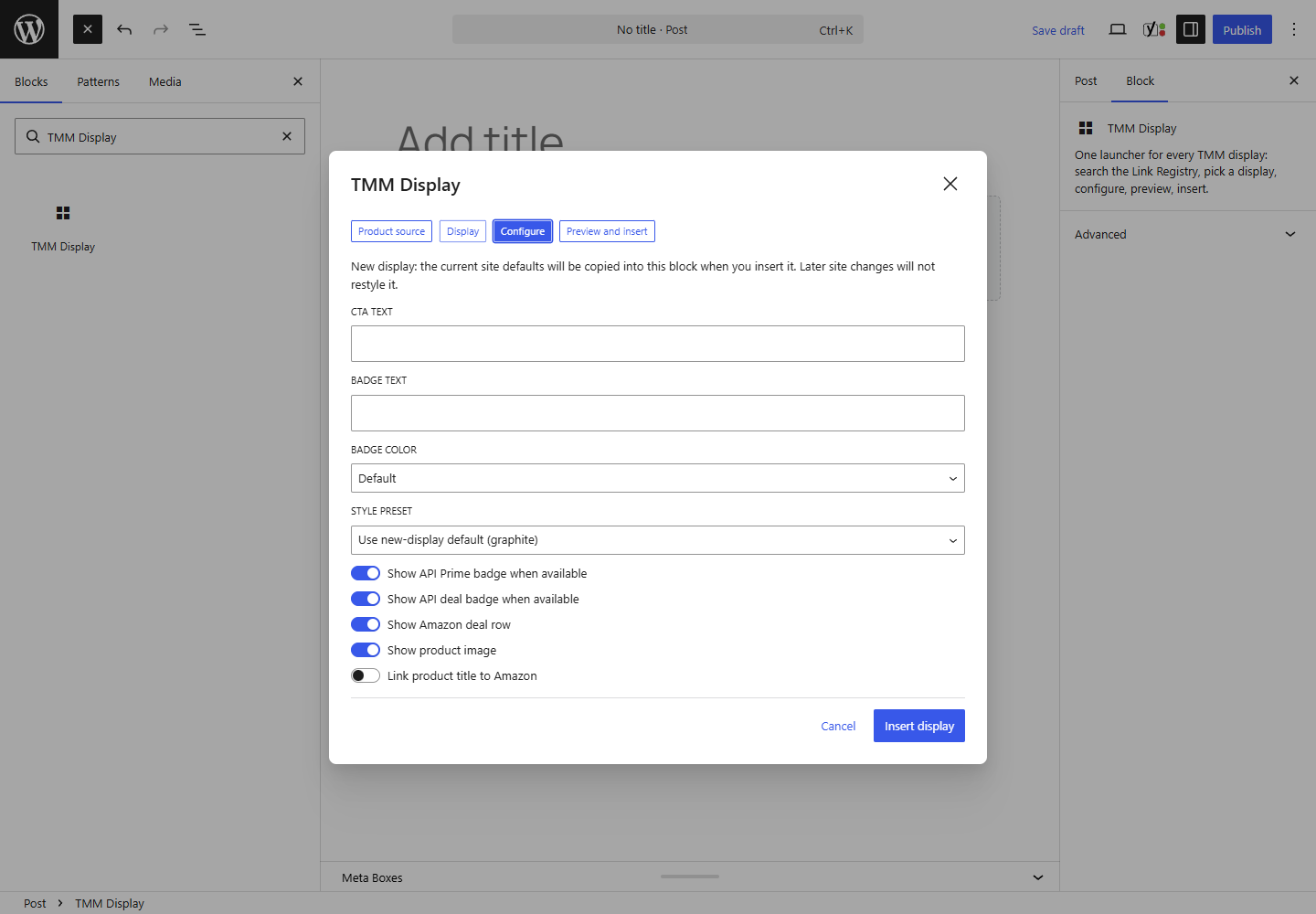
- TMM Display: a Gutenberg launcher that helps an editor select and configure a display. It removes the need to memorize shortcode syntax. When Elementor is active, its matching widget uses the same server-rendered output. Classic Editor and other builders still have a shortcode fallback.
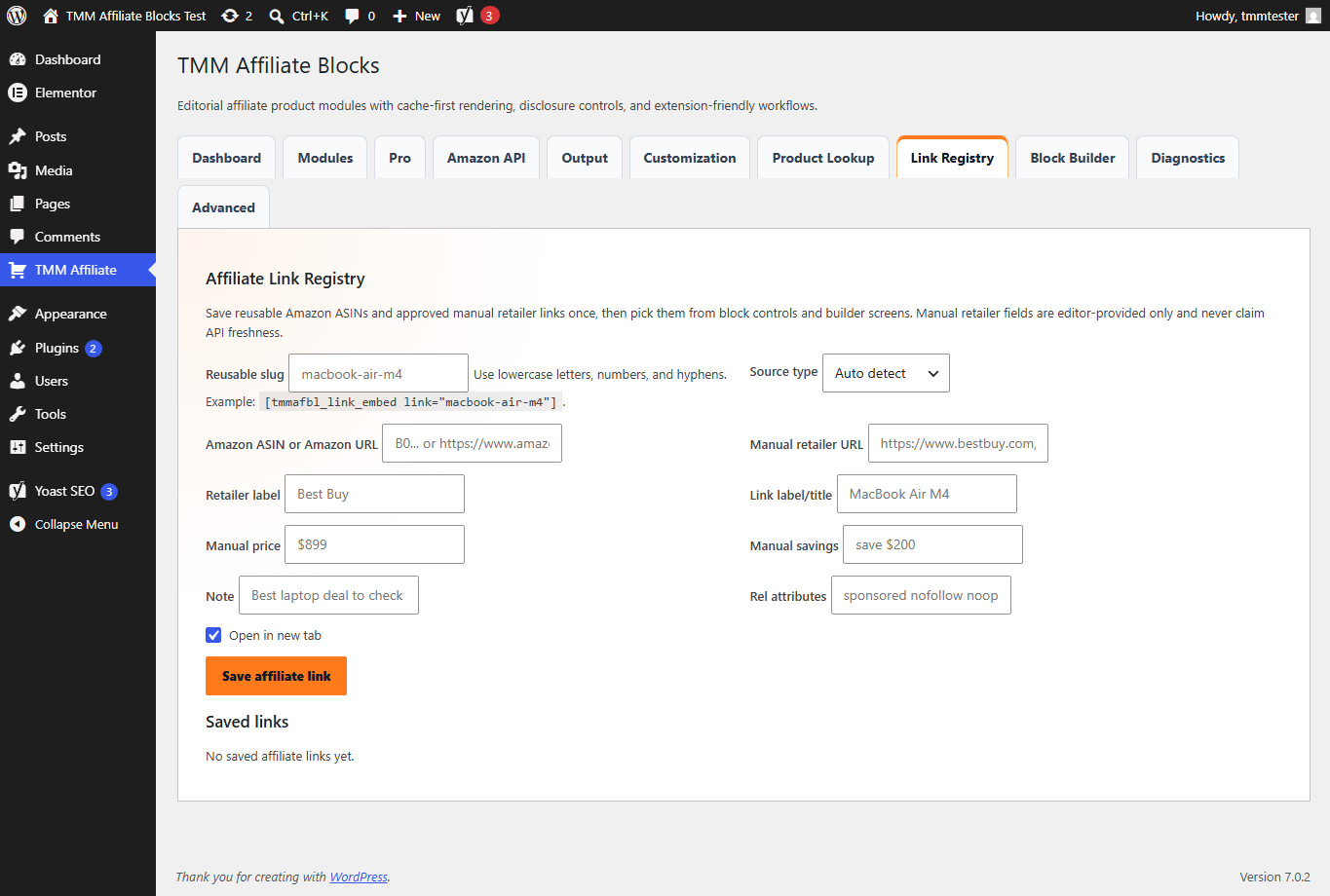
- Link Registry: reusable ASIN and approved manual-retailer destinations, so a team does not recreate the same link setup in every draft.
- Display Defaults and Block Builder: reusable visual defaults, visual previews, and copy-ready setup where a visual builder is not available.
- Disclosure and diagnostics: an affiliate-disclosure block, optional automatic disclosure insertion, cache/ASIN checks, manual-URL checks, and editor-facing QA information.
For Amazon-backed fields, logged-out public pages render from cached data by default. In particular, the plugin does not scrape Amazon pages. It also does not invent price, savings, stock, Prime, merchant, or discount values when a configured source lacks them. Instead, editors provide manual retailer prices and savings notes. Those are not real-time retailer claims. Likewise, an Editorial Rating records publisher judgment. It never imports Amazon customer-review scores.

Where Pro earns its place
The separate Pro add-on requires the free plugin. TMM does not bundle it into the WordPress.org package. The free plugin also cannot silently activate paid modules. Therefore, the boundary stays clear: install Free for publishing fundamentals, then add Pro only when the workflow needs more scale.
The current Pro workflow includes Best Picks Grid and advanced comparison workflows. In addition, it includes privacy-safe aggregate Click Analytics, Link Health, cache-health and refresh-queue tools, CSV import/export, migration support, Saved Kits, style packs, ratings/comparison utilities, licensed updates, and the customer download/license path. As a result, these tools help publishers maintain a growing product-content library. They are not required to make a basic product card work.

Current annual Pro plans are Starter at $25 for one site, Growth at $59 for three sites, and Publisher at $119 for ten sites. See the current feature path on the TMM Affiliate Blocks pricing page. A free install can remain free. The WordPress.org package contains no payment, license validation, private updater, or customer-record code.
A cache-safe approach is a publishing feature
Affiliate readers should never see a blank shopping card because a data refresh needs attention. Therefore, TMM Affiliate Blocks uses a cache-first public renderer. Privileged editor and administrator workflows handle product lookup, credential checks, ASIN checks, diagnostics, and refresh work. When live product fields are unavailable, the plugin shows a readable fallback and a retailer destination. It does not show a made-up price or broken raw setup text.
This approach is deliberately more conservative than calling a product API on every reader visit. As a result, public pages stay calmer. Browser sessions never receive credentials. Additionally, editors get a view of cache age and data coverage before publication. Pro expands this path with health and queue tooling. Free already keeps the public rendering contract cache-first.
TMM Affiliate Blocks Free vs Pro at a glance
There is no universal winner. The right tool depends on the publisher’s main problem. That may be Amazon-only automation, a broad link-management suite, or an editorial workflow inside WordPress. We checked each product’s public documentation on July 20, 2026. This table does not claim that one plugin replaces every feature of another.
| Publisher need | TMM Affiliate Blocks | AAWP | Lasso |
|---|---|---|---|
| Best fit | Editorial WordPress publishers who want useful Free blocks and an optional Pro layer. | Amazon-focused publishers who want Amazon-specific product and data tools. | Publishers who want a broader link-management and display suite. |
| Editor workflow | Gutenberg launcher, Elementor widget when active, Classic Editor, and shortcode fallback. | Shortcode/template workflow with theme independence documented by AAWP. | Centralized link/display workflows with several display types. |
| Product-data stance | Cache-first rendering; no scraping; omit or safely fall back when approved source data is absent. | AAWP documents automated updates through Amazon’s Product Advertising API and an AAWP API option. | Product-link and display management across its wider affiliate workflow. |
| Reader-facing formats | Free Card, Horizontal, and Minimal Product Boxes plus Deal Link and Link Embed. Pro adds grids and advanced comparisons. | Amazon product boxes, lists, tables, and templates. | Single, button, image, list, grid, and gallery displays. |
| Operational tools | Free diagnostics and Link Registry; Pro adds Click Analytics, Link Health, cache health, CSV, migration, and Saved Kits. | Amazon-oriented tooling and automated data updates. | Link management, displays, and its wider monitoring/analytics workflow. |
AAWP’s feature documentation is a strong reference for Amazon-centered automation. Likewise, Lasso’s feature documentation helps teams assess a larger link-management and display platform. TMM does not try to be every tool at once. Instead, it gives WordPress editors a source-aware publishing system, a genuine free core, and an affordable upgrade path.
Who should choose TMM Affiliate Blocks
Choose the free plugin for better product presentation, reusable destinations, clearer disclosures, and a cache-first Amazon workflow. Additionally, it gives you responsive layouts without buying a suite before you need one. It works especially well for review posts, buyer guides, deal roundups, and product mentions that need consistent treatment.
Add Pro when the pain shifts from making a single block to maintaining a library of affiliate content. For instance, that can include checking links, reading aggregate click signals, refreshing cached collections, moving legacy links, reusing product kits, exporting workflow data, or building richer comparisons. In other words, we designed the upgrade as a decision about scale, not a tax on basic publishing.
Frequently asked questions
Does the free plugin include Pro features?
No. The free package can show a clear path to the separate Pro add-on. However, it does not package payment, licensing, private updates, customer records, or hidden paid modules. Pro features appear only after the separate licensed add-on is installed and active.
Does TMM Affiliate Blocks scrape Amazon or show live prices to every visitor?
No. The plugin uses supported Amazon credentials and cache-first public rendering. It does not scrape Amazon pages. It should not display price, stock, discount, or similar fields unless an approved source/cache provides them.
Can I use manual retailer links?
Yes. Deal Link, Link Embed, and the Link Registry support approved manual retailer destinations. Editors enter those values as editorial copy. Therefore, publishers should review them as carefully as other product copy.
Where can I see the plugin in action?
Start with the TMM Affiliate Blocks demo. Then see the plugin in live editorial context on Tech My Money deal and buyer-guide pages. The WordPress.org listing also shows reader-facing blocks, the Gutenberg launcher, Link Registry, defaults, and the Pro workflow path.
Start with the workflow you actually need
Affiliate content works best when the reader understands the recommendation, the affiliate relationship, and the next step. With that in mind, TMM Affiliate Blocks starts with that publishing problem. Install the free plugin from WordPress.org. Next, test it on staging. Then add Pro when its operational tools will genuinely save your team time.